Anthony Saviano
Point your agent at Soundbox
A local tool should hand an agent a filesystem path, not a payload — and connecting one to a full multi-model audio studio is a line of config.

You are building a game, or an app, or a video, and it needs sound. You are already in a conversation with an agent that is writing the code around that sound. The gap between those two facts is usually a browser tab, an account and a download folder — this post is about closing it with one line of config.
It covers connecting a client, the shape of what comes back, and why the stdio bridge is built the way it is. It does not cover the HTTP API in detail (that is docs/API.md), the voice and story tools, or which model to pick for what.
The one line
The MCP server runs inside the main Soundbox process, at
http://127.0.0.1:17494/mcp. There is no separate daemon to start; if the app
is running, the surface is up. In Claude Code that is one command:
claude mcp add --transport http soundbox http://127.0.0.1:17494/mcpand in anything that takes a JSON config file:
{
  "mcpServers": {
    "soundbox": { "type": "http", "url": "http://127.0.0.1:17494/mcp" }
  }
}
Note the missing trailing slash. Soundbox rewrites /mcp onto the mounted path
internally rather than answering with a 307, because a redirect on a POST is the
kind of thing half the clients in the world quietly drop and none of them
mention. The URL you paste is the URL that works.
Over HTTP there is nothing to install on the agent's side at all — no key to
mint, no account, no binary on PATH, because there is no auth and no Python.
The server is TypeScript, and that is the entire runtime story;
what audio.cpp replaced is how it got that way.
What comes back is a path
Every result from soundbox.generate carries an absolute filesystem path to
a WAV on your own disk. Not a base64 blob the agent has to decode, not a signed
URL that expires, not an id it has to exchange for bytes in a second call.
The difference sounds cosmetic until you watch an agent use it. With a path, the
next step is ffmpeg -i <path> ..., or a copy into assets/audio/ — ordinary
shell work the agent is already good at. With a payload, the next step is
writing a decoder, choosing a temp directory, and hoping the model does not
summarise the bytes on the way through its own context. A local tool talking to
a local agent over a local socket has a filesystem in common. Use it.
The same principle runs through the rest of the tools. list_models returns
commercial_use as yes / no / conditional, so an agent working on
something commercial can check before it generates rather than after you ship.
And generate blocks until the audio is on disk — seconds to a minute depending
on model and length, which is why the bridge sets a request timeout long enough
to look like a mistake. A tidy thirty seconds would have been the mistake.
The other shape: a studio you rent
The usual way to get generative audio into a project is to rent it: a hosted studio with one model behind it, a subscription for access to that model, and every second of audio you make on someone else's disk under someone else's terms. It works. It also means your sound design is a billing relationship, your model choice was made for you, and going offline means going quiet.
Soundbox is the other shape: several models behind one interface, running locally, working offline once the weights are downloaded, with no account, no API key and no per-generation billing. There is a small opt-in cloud catalogue for models that cannot run locally — off by default, per model, and it says so, because those generations do leave your machine and are billed. The licence for each model is on its card before you download it, and Soundbox itself is MIT.
The point is not that renting is wrong. It is that when the audio, the model and the agent are all on your machine, the integration can be a path instead of a payload — and that only stays true if nobody in the chain owns the disk but you.
The bridge that refuses to load models
Some clients only speak stdio. The obvious way to serve them is a bridge that
loads the models itself and answers in-process. Soundbox does not do that, and
server/src/mcp/stdio.ts says why in its own header:
This does NOT load models. It is a thin proxy onto a running Soundbox server — one GPU, one process holding the weights. If the server isn't running, tools return an actionable error rather than silently starting a second copy.
What the obvious version gets you is two copies of a diffusion model fighting over one GPU: the app you have open and the bridge your editor spawned, each convinced it owns the VRAM. That is not a slow path, it is an out-of-memory error at the worst moment, and it is invisible — the agent asked for a sound and something died three layers down. Soundbox holds one model at a time deliberately, and a second process is the one way to defeat that from outside the app.
So the bridge proxies, and when it cannot reach the server it says so in words
the agent can act on: start it, or set SOUNDBOX_URL. It reports its own calls
back to the server too, marked transport: stdio — otherwise the server sees
only the bridge's HTTP requests and never the client behind them.
{
  "mcpServers": {
    "soundbox": {
      "command": "node",
      "args": ["/absolute/path/to/soundbox/server/dist/mcp/stdio.js"]
    }
  }
}
An absolute path, rather than one of the shorter names, because the shorter
names do not resolve: soundbox-mcp is a private package, so npx 404s on it,
and the bare command is only linked into the checkout's own node_modules/.bin,
which is not on the PATH an editor spawns an MCP server with. Until recently
five places in this repo told you how to launch that bridge, in three mutually
incompatible ways, and every one of them was wrong — two pointed at a backend/
directory deleted when the server became TypeScript, two told you to npx the
private package, and the last named the bare command. That is the second reason
to prefer HTTP where your client speaks it. A proxy whose whole purpose is
avoiding a second process is a proxy to skip when you can.
Watching it work
Open the Agents page and you can see every client that has connected: what it
called, whether it worked, how long it took, and every sound it produced.
Attribution needs no configuration — MCP's own clientInfo handshake carries the
agent's name and version, so its sounds are tagged with that identity and the
Library can filter to them. There is no header to add, because there is no auth
to add it to.
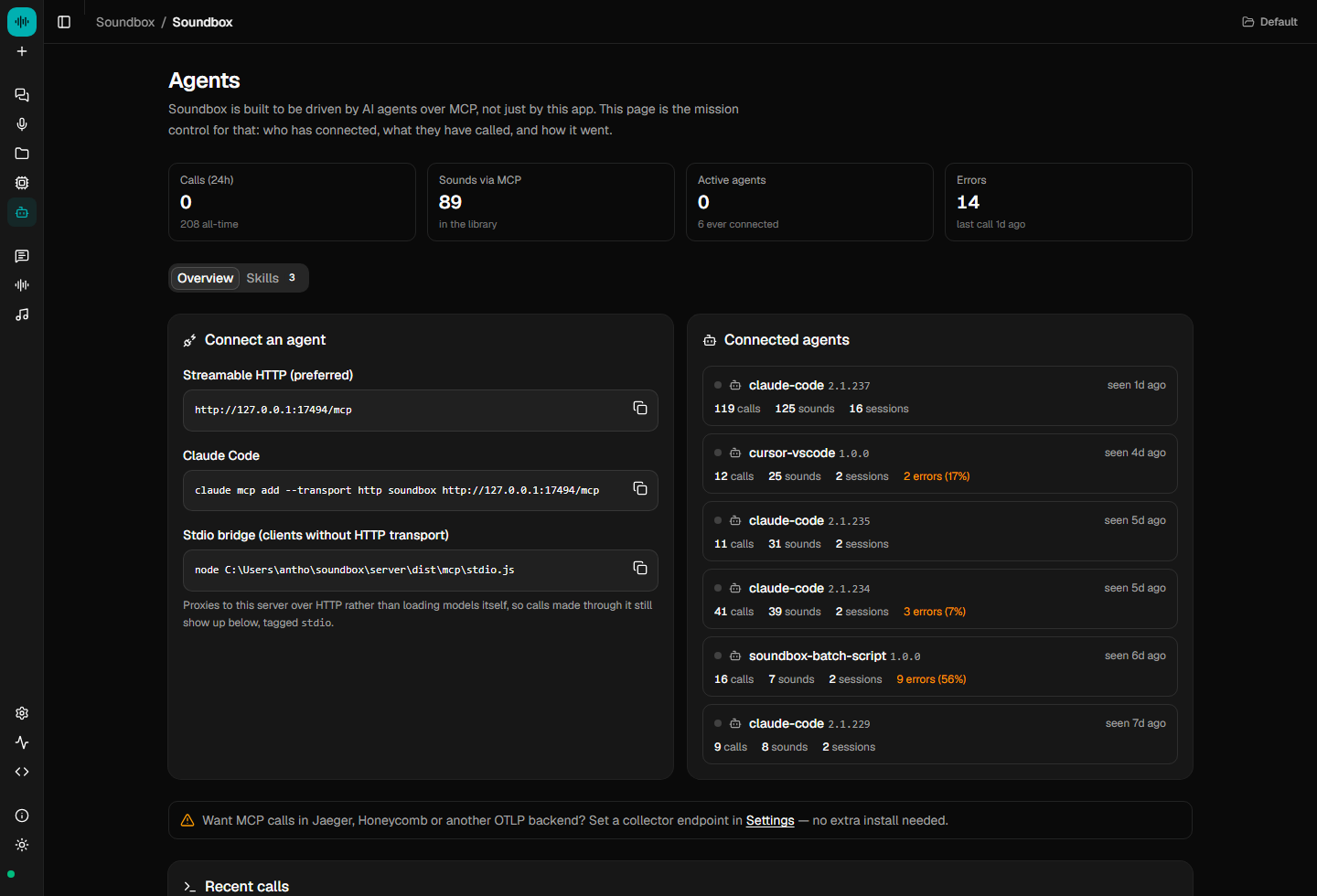
That page prints the stdio line with the path filled in for the install that is running, which makes it the one copy of that command that cannot go stale behind you.
Skills ship in server/skills/: soundbox-sfx teaches prompting technique and
tool usage, and soundbox-sound-pass inventories every sound event a project
needs and generates them. They exist because these models respond to material,
action and space — "low metallic groan of a ship's hull under pressure" — not to
mood words, and an agent left to work that out by trial and error works it out
with your GPU.
soundbox skills install                  # -> ~/.claude/skills/
soundbox skills install --target cursor  # -> ~/.cursor/skills/
or one click on the Agents page.
The full tool reference, the delivery options for speech, and the OpenTelemetry export are in docs/MCP.md. Start the server, paste the line, and ask for a door.