Anthony Saviano
One model at a time
One GPU holds one model at a time. One run in the server's own log — 15.1s when the model has to load, 1.7s when it is already resident.

The Soundbox catalogue runs to forty-six models and the app holds exactly one of them in VRAM. Loading a new one unloads the old — the Models page says so in its own subtitle — and every other decision follows from it: why the first call to a model is slow and the second is not, why the stdio bridge refuses to load anything, why the VRAM column sits next to the Load button rather than behind a details pane. This post is about that constraint and what it costs you in seconds. It does not cover which model to pick for what — that is the Models page — or how audio.cpp works underneath, which is what audio.cpp replaced.
The arithmetic
The catalogue in server/src/models/audiocpp_models_catalog.json holds four
models verified end to end — weights downloaded, loaded, generated and decoded
on a real machine — and forty-two more that are catalogued but untested, each
hidden until you opt its id in from Settings. So the length of your list is your
own doing: GET /api/models returns the four plus whatever you have switched
on, and the machine below has enough extras enabled to show fifteen rows. The
Status column is honest rather than aspirational, and it stays that way because
the alternative is a list where every row looks equally proven and one of them
is a stub.
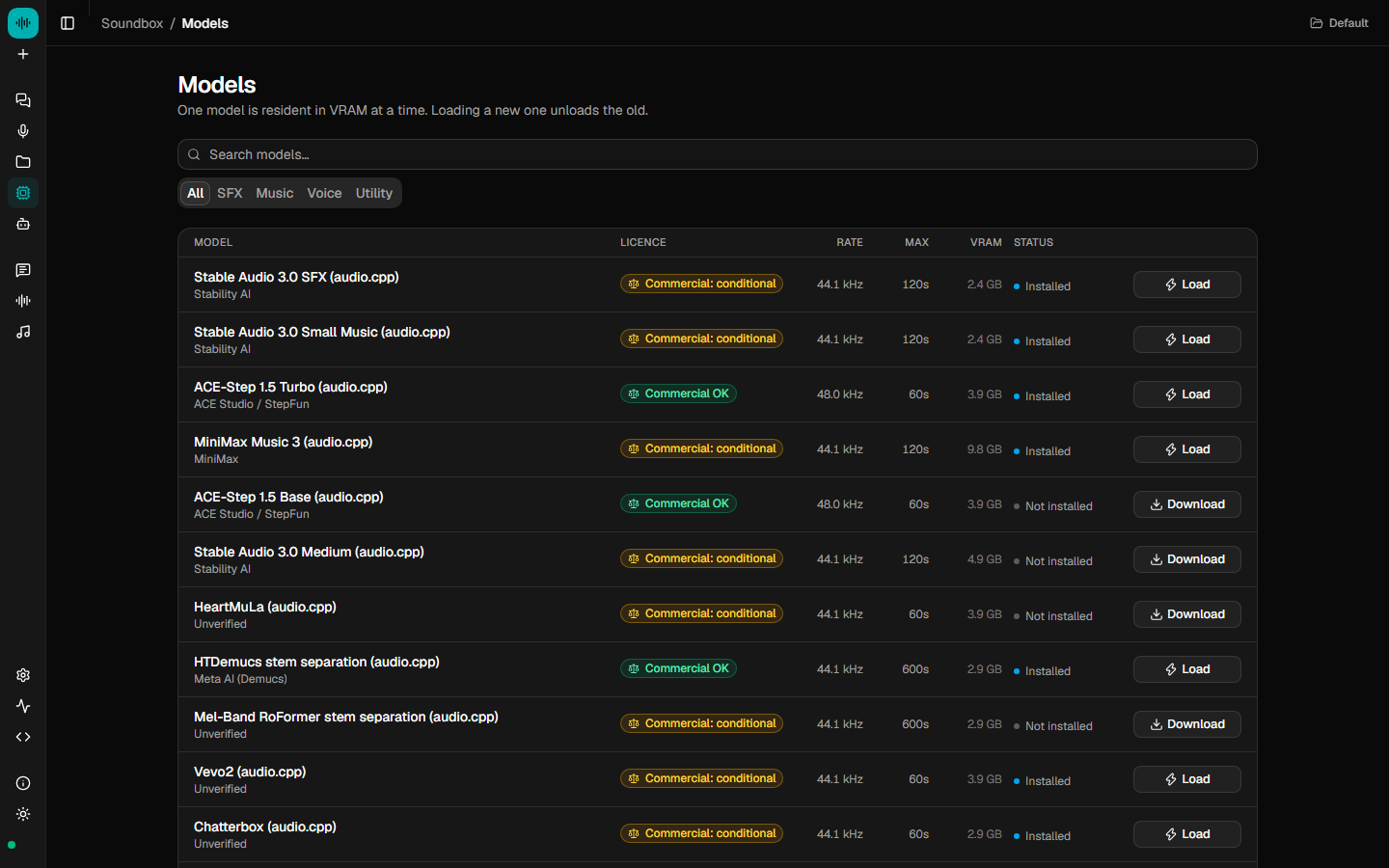
The VRAM column is the point. Stable Audio 3.0 SFX wants 2.4 GB. ACE-Step 1.5 Turbo wants 3.9 GB. MiniMax Music 3 wants 9.8 GB, and further down there is a MiniMax H3 entry estimated at 35.9 GB, sitting in the same table with the same Download button as though all four were interchangeable rows in a list. On an 8 GB card the first two are a choice, the third does not fit, and the fourth is a different computer.
Forty-six models, one slot. No card holds that catalogue open at once, so the honest design is a single tenancy stated up front with the rent printed beside each name. Licences are surfaced the same way and for the same reason: the things that will stop you are shown before the download, not after.
What the log shows
Two jobs on the same model, half a minute apart, in the server's own log — which the app puts on the Activity page by default.
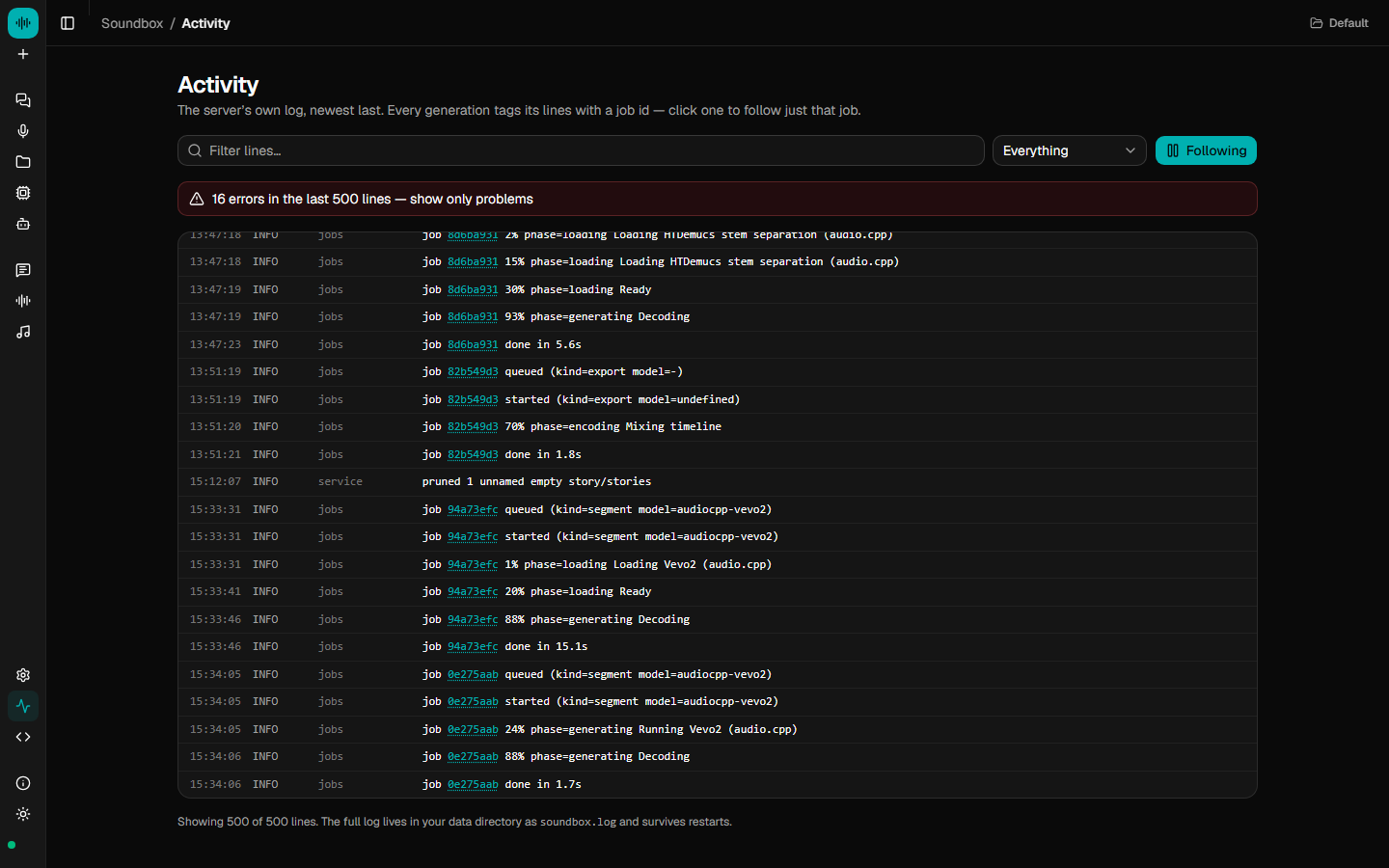
The first job spends ten seconds in phase=loading before it reaches Ready,
then decodes, and finishes in 15.1s. The second has no loading phase in it
anywhere: straight to phase=generating Running Vevo2, done in 1.7s. Same
model, same machine, same afternoon, and the only difference is that the weights
were already there the second time.
That is one run on one machine and not a benchmark — your card, your model and your clip length will all move those numbers. What generalises is the shape: the load is a fixed cost you pay once per residency, and everything after it is the generation itself. Which is why the fix for a slow session is scheduling rather than tuning. Do all your sound effects, then all your music, then all your voice lines, and you pay the load three times instead of thirty.
The model does idle out — auto_unload_minutes defaults to 10 in
server/src/config.ts, so one you have stopped using gives the VRAM back rather
than squatting on it until you quit. Come back after lunch and you pay the load
again. That is the trade, and it is visible in a log rather than inferred from a
spinner.
Why the bridge will not load a model
The stdio MCP bridge, for clients that cannot speak streamable HTTP, is a thin proxy onto a running Soundbox server and nothing more. Its header says why in seven words: one GPU, one process holding the weights. If the server is not running the tools return an actionable error rather than quietly starting a second copy — because a second copy is a second process convinced it owns the VRAM, and the first sign of that is a failure in whichever of the two happened to ask second.
One slot means one owner, so the bridge is a client of the thing that owns it. Connecting an agent is covered in point your agent at Soundbox and in docs/MCP.md.
The alternative, and why not
The obvious other answer is to keep several models resident and let the driver
sort it out. On a consumer card that does not degrade into a slowdown; it
degrades into an out-of-memory error, mid-generation, three layers down, as a
failure your agent has no way to explain to you. The comment in
server/src/models/manager.ts names the design target — a 16 GB consumer card —
and the conclusion follows: loading model B unloads model A first. The cost
becomes ten seconds you can see in a log, at a moment you chose, on a page that
tells you what is resident. A visible ten seconds beats an invisible crash.
Hosted models are the exception, and they are the exception because they are not
resident at all. A model running on fal never takes the slot and never evicts
whatever has it — but the prompt leaves your machine, which is why
enabled_fal_models defaults to empty and every hosted model is opt-in per id.
Everything else here runs on your own hardware, works offline once the weights
are down, and uploads nothing. Soundbox itself is MIT.
One slot is not a limitation the product apologises for. It is the shape of the hardware, written down where you can read it.