Sound effects, music and voices, generated on your own machine
Describe a sound and get a WAV. Write lyrics and get a song. Clone a voice from a short clip. Arrange it all on a timeline, or let your coding agent do it over MCP. Open-weight models, no account, works offline.
Each example names a material, an action and a space.
Prompt to sample
A sentence, and then a file on your disk
Nothing is uploaded and nothing is billed per second. Scroll to follow one generation through the phases the server reports.
Prompt
heavy wooden door slamming in a stone corridor
nothing generated yet
One pipeline
One prompt box, three kinds of audio
Sound effects, music and speech come out of the same prompt box and land in the same workspace. Scroll to follow one of each from a sentence to a clip on a lane.
Prompt
heavy wooden door slamming in a stone corridor
Screenshots
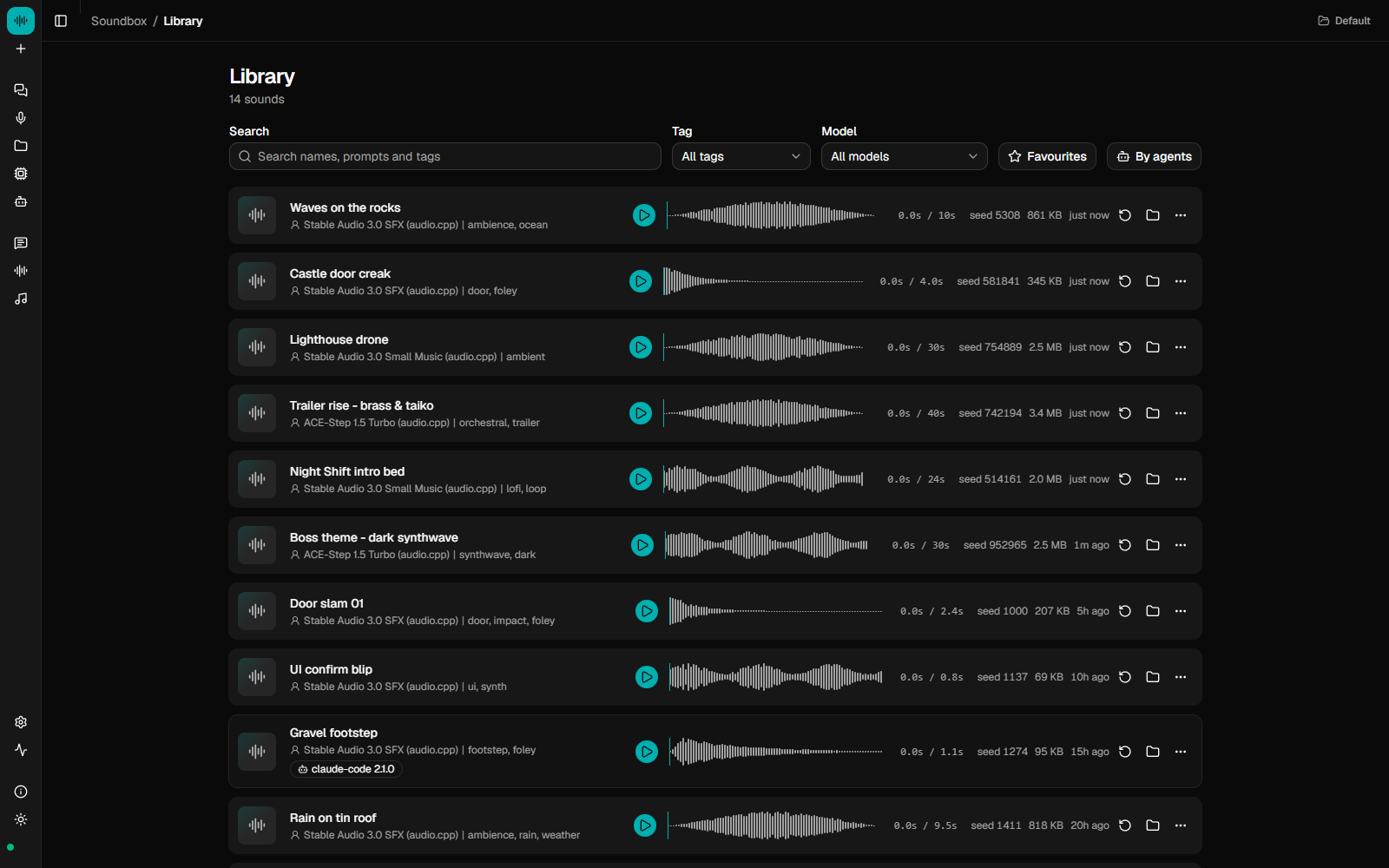
The running app
Captured from the app: the library with its prompts and seeds, the Agents page with its call history, and the music studio.
Built for agents
An MCP server, and a log of every call
Connect Claude Code, Cursor or any MCP client and it can generate, speak, arrange and export audio as part of a larger task. The Agents page in the app logs every call: which client made it, what it asked for, and whether it worked.
Calls (24h)
37
Sounds via MCP
12
Active agents
1
Errors
0
14 calls · 9 sounds · 1 session
- generategravel footstep, outdoor, close mic
- list_models
- generatewooden crate dropped on concrete floor
Every agent, identified
Each call is attributed to the client that made it, by name and version, from the MCP handshake. There are no headers to add.
Optional OpenTelemetry
Set otel_endpoint to your own collector and each tool call is exported as a trace and a metric over standard OTLP/HTTP.
Bundled agent skills
Three skills ship with Soundbox: prompting for sound effects, a sound pass that finds and generates every sound a project needs, and writing and voicing dialogue. Install them from the Agents page or with soundbox skills install.
Models
One runtime for every model, with the licence shown first
Every model runs through audio.cpp, a native runtime, so there is no Python to set up. audio.cpp implements a fixed set of model architectures, and a model must be one of them, quantised to GGUF, to run. You can point it at your own weights for an architecture it already supports (see bring your own model). A new architecture needs a new loader in audio.cpp. Each model shows what you may do with its output before you download it, and non-commercial models ask you to confirm the restriction.
Stable Audio 3.0 SFX
Stability AI
- Output
- audio.cpp (GGUF)
- Max clip
- —
- Download
- —
Commercial: conditionalStability AI Community LicenseVerified
Stable Audio 3.0 Small Music
Stability AI
- Output
- audio.cpp (GGUF)
- Max clip
- —
- Download
- —
Commercial: conditionalStability AI Community LicenseVerified
ACE-Step 1.5 Turbo
ACE-Step
- Output
- audio.cpp (GGUF)
- Max clip
- —
- Download
- —
Commercial OKMIT LicenseVerified
MiniMax Music 3
MiniMax
- Output
- audio.cpp (GGUF)
- Max clip
- —
- Download
- —
Commercial: conditionalMiniMax-Music3 Community LicenseVerified. Needs about 10 GB of VRAM
What “verified” means
The four models above have been run end to end on real hardware and are on by default. Start with Stable Audio 3.0 SFX to check your setup. 42 more models (text-to-speech, music, stem separation and voice conversion) are in the catalog and can be switched on from the Models page. Of those, VibeVoice 1.5B has also been run end to end; the rest are marked unverified until someone reports a result. Reports either way help.
The licence chips are a summary and are not legal advice. Read each licence before you ship what a model made.
Local and offline
Nothing is uploaded
Soundbox is a server on your loopback interface and a folder on your disk. Weights download from Hugging Face when you ask for them. After that it works offline.
No account or credits
There is no sign-up and no usage meter. Audio models download without an account.
Your library is files on disk
One SQLite file and one folder of WAVs under ~/.soundbox. Back it up, sync it or delete it like any other folder.
Licences before downloads
Every model card states its terms and colour-codes commercial use. Non-commercial weights need an explicit confirmation that names the restriction.
Prompt, seed and settings kept
Everything you generate is saved with what produced it, so you can search it, tag it, favourite it and regenerate from it.
Where things live
~/.soundbox/
├── soundbox.db      SQLite: prompts, seeds, tags
├── sounds/          the WAVs, one per generation
└── models/          weights you chose to download
The backend binds 127.0.0.1:17494. The UI talks to that and to nothing else.
Writing prompts that work
Name the material, the action and the space
These models were trained on captions of recordings, so they respond to descriptions of what is making the sound and where. Mood words produce noise.
Too vague
scary sound
It names no material and no action, so the model returns noise.
Usable
low metallic groan of a ship’s hull under pressure, distant, reverberant
Material (metal hull), action (groaning under pressure), space (distant, reverberant).
Keep clips short and layer them in your editor. A three-second clip is easier to place than a twenty-second one.
API & MCP
An HTTP API and an MCP endpoint on port 17494
The server behind the UI also serves an HTTP API and an MCP endpoint, so an agent can build a level and make its door sound in the same task. Results include the WAV’s absolute path, which you can pass to ffmpeg or copy into a project.
{
  "mcpServers": {
    "soundbox": { "type": "http", "url": "http://127.0.0.1:17494/mcp" }
  }
}curl -X POST http://127.0.0.1:17494/api/generate \
-H 'Content-Type: application/json' \
-d '{"model":"audiocpp-stable-audio-3-sfx","prompt":"heavy wooden door slamming in a stone corridor","duration_s":3}'21 tools, including generate, speak, separate, list_sounds and export_story.
Getting started
Install, pick a model, generate
A GPU is not required, but CPU generation is slow. A few GB of VRAM covers the verified models, and each model card shows its footprint. To try the UI with no GPU or server, npm run dev:mock runs it against an in-browser fake.
Install the app
Download the installer for Windows 10 or 11, or macOS on Apple silicon or Intel. It carries its own runtime, so nothing else needs installing. The builds are not signed yet, so the first launch asks you to confirm.
Download a model
The first run walks you through picking models for your GPU, and each model downloads from inside the app the first time you use it. Start with Stable Audio 3.0 SFX to check your setup, then pick the model whose licence suits what you are making.
Or run from source
Requires Node 22.12 or later, with no Python and no CUDA toolkit.
npm run devstarts the server on port 17494 and the UI on 5174. Inference runs inaudiocpp_cli, a native binary that picks CUDA, HIP, Metal, Vulkan or CPU automatically and is cached under~/.soundbox/bin/.
git clone https://github.com/Gadurp1/soundbox
cd soundbox
npm install
npm run dev